
AI-POWERED SCHEDULING
IAU Deanship Dashboard
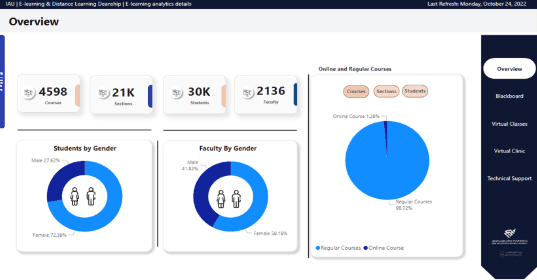

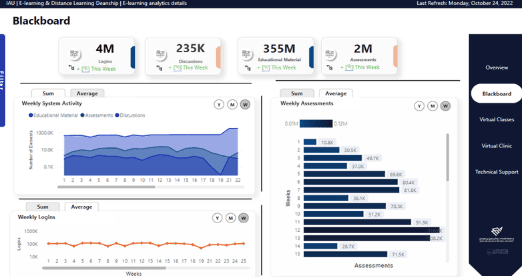
I built an interactive Power BI dashboard for the Deanship of E-Learning at IAU to help track key metrics and support faster decision-making.
The dashboard consolidates data into a single view, making it easier for staff to monitor performance and identify trends.
This section details the step-by-step approach taken during the project.
System Analysis
During the analysis phase, I worked closely with employees to understand how the current system was used and identify key challenges.
I defined core platform components such as assessments, discussions, and educational content, ensuring the dashboard reflects real operational needs.
By reviewing existing reports and university infographics, I identified inefficiencies, including slow access to information, time-consuming decision-making, and reliance on static reports.
To address these issues, I designed an interactive dashboard connected to a dynamic data source, allowing real-time updates and significantly reducing the time and effort required to access insights.
Database design and Implementation
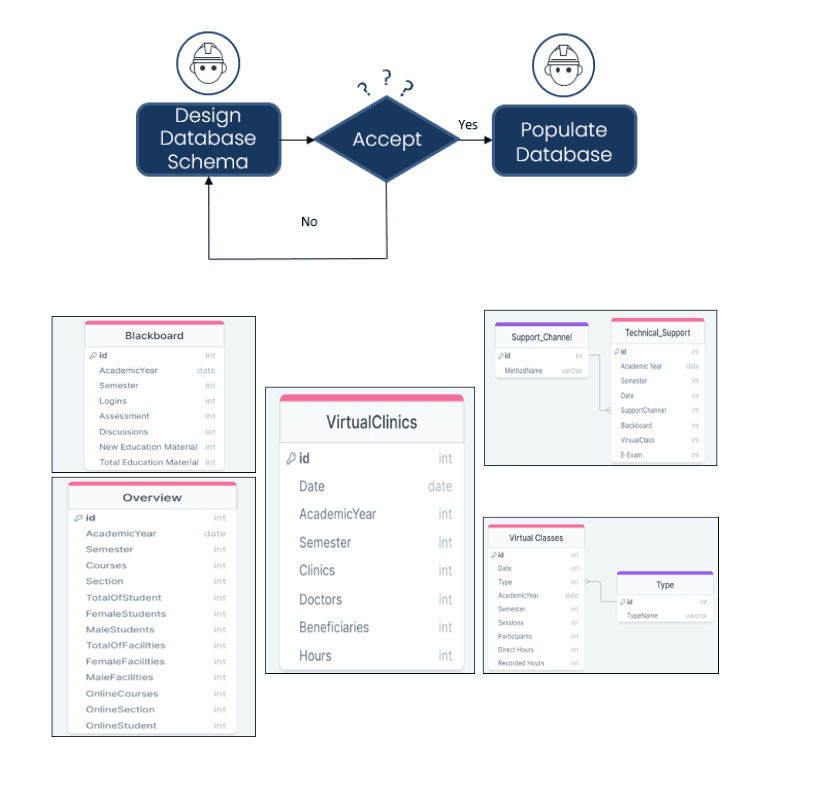
I designed the database structure by organizing the data into clear entities and defining relationships and constraints between them.
I created schemas for systems such as Blackboard and Zoom, then refined them iteratively to ensure accuracy and usability.
The final schema provided a clear structure for both developers and analysts, supporting efficient data handling and reporting.
To improve data organization and reduce redundancy, I introduced additional tables such as Types, Departments, and Roles. This helped minimize errors and made the system more scalable and easier to maintain.
Dashboard Design and Refinement
I developed the dashboard using Power BI to enable interactive data analysis and clear visualization of key metrics.
Before building the final version, I created initial sketches to define the layout and user experience.
The dashboard was developed iteratively, with multiple versions presented and refined based on feedback to improve usability and clarity.
I carefully selected visual types to match the data and avoid misinterpretation. For example:
Cards for key metrics
Bar and column charts for category comparisons
Line charts for trends over time
Pie and donut charts for proportions
This approach ensured the dashboard is easy to navigate, visually clear, and supports accurate data interpretation.
During this 11-week project, I applied my data analysis and visualization skills in a real-world environment, working closely with a professional team.
This experience strengthened my ability to translate data into actionable insights and build solutions that meet real user needs.
I also developed strong communication and teamwork skills by collaborating with stakeholders and incorporating feedback throughout the project.
Overall, the project enhanced both my technical and professional skills, giving me practical experience in delivering data-driven solutions.